The RTE Administrator is a companion program that helps educators manage the Respiratory Software
Programs - and best of all - it is available FREE with your Respiratory Software purchase.
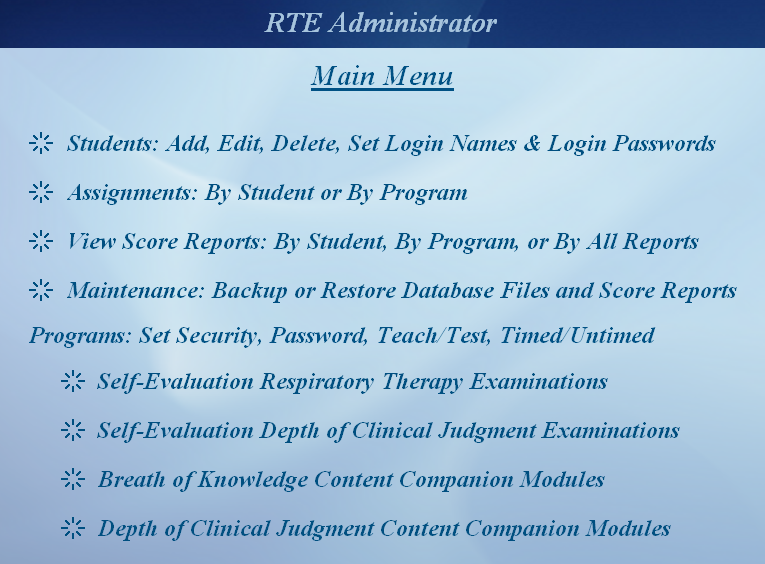
The RTE Administrator contains five primary sections:
- Students: Add, Edit, Delete, Set Login Names & Login Passwords.
- Assignments: By Student or by Program. Assign one or more programs to an individual student, or assign one or more students to an individual program.
- View Score Reports: By Student, By Program, or By All Reports. View a record of each and every student who has accessed the Respiratory Software Programs. If the student received a score report, the complete score report that the student received is shown. If the student exited the program before receiving a score report, a record of the time, date, student name, and the statement that the student viewed the questions of the program but exited before receiving a score report is shown.
- Maintenance: Backup or Restore Database Files and Score Reports. This feature allows you to make a backup copy or restore the RTE Administrator's database file or to make a backup copy or restore student score reports, as well as the ability to delete student score records that are outdated and no longer needed.
- Programs: Set Security, Password, Teach/Test, Timed/Untimed
- Set Security: This feature allows you to set a software program to either Locked mode or Open Enrollment mode. Locked mode - anyone accessing the program must have a valid Login Name and Login Password and be assigned to the program. Open Enrollment - anyone may access the program.
- Set Password: This feature allows you to set your own customized password for each software program. This feature is optional. If you do not set a password, the program will not ask for a password upon entry into the program. If you choose to set a password, the program will request the password upon entry into the program. If the program is password protected, no one may access the program without knowing the correct password.
- Set Teach/Test: This feature allows you to choose whether you want your students to view their correct answers and the rationale for the correct answer. Each software program can be individually set to either the teach mode or test mode.
- Set Timed/Untimed: This feature allows you to set a program to timed mode (4 hours for the RTE programs) or untimed mode (no time limit). This feature is only available for the RTE programs, all other programs do not need to be timed.
The RTE Administrator is password protected. You may change the password at any time by choosing "change the RTE Administrator password" from the Main Menu.
to set program security, program password, teach/test mode,
timed/untimed mode (only applicable to the RTE programs),
student assignments, and view users' score reports.
Note: The Respiratory Software Programs are for institutional purchase only.
Copyright © 1995 - 2027, C&S Solutions. All rights reserved.
All software is copyright and protected under U.S. Copyright Law. Text, graphics, animations, audio, and video content of each software program may not be reproduced or transmitted in any form or by any means, electronic or mechanical, including photocopying, recording, or any information storage and retrieval system, without specific permission in writing from C&S Solutions.
